

You stare at your living room, knowing it needs a fresh look, but you feel completely stuck.
Moving heavy wooden furniture around the floor just to see if a sofa fits is exhausting. Buying a expensive rug or painting an accent wall only to realize the colors clash leaves you with instant regret and a lighter bank account.
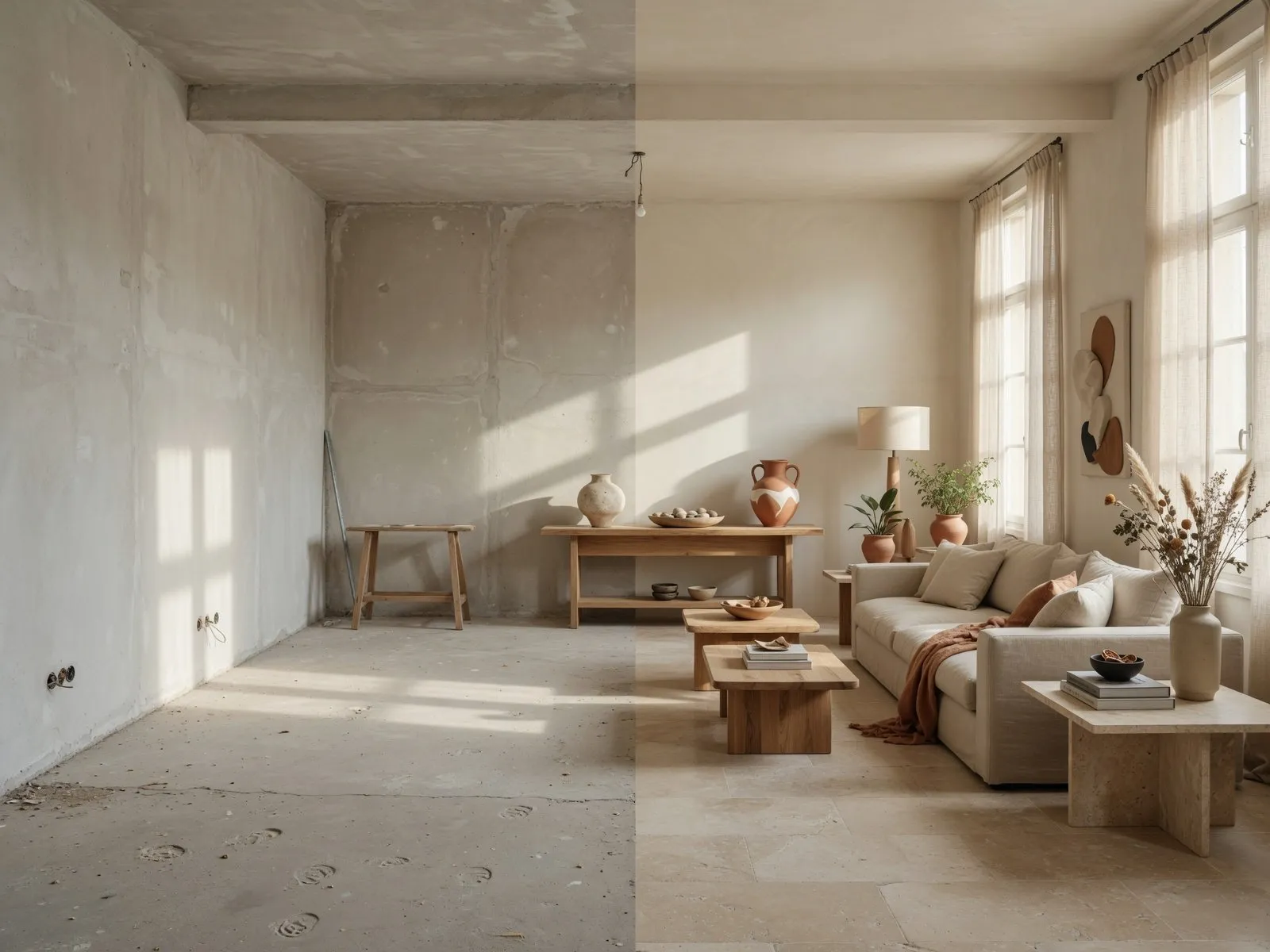
Here's the deal:
You want to redesign your space, but you do not know which tool will actually help. Downloading five different apps only to find paywalls or glitchy controls wastes your entire evening.
Finding the Best AI Room Planner comes down to one goal: seeing new layouts and colors clearly on screen before you spend money or lift a single chair. Using a reliable AI room planner lets you test ideas instantly, swap furniture styles, and see exact room transformations so you can decorate with total confidence.
What Can an AI Room Planner Actually Do for You?
Can you really see your room differently before moving everything?
Yes. You do not need to measure walls with a tape three times or draw confusing floor sketches on paper.
Think about it:
A practical AI Room Planner solves four specific problems for you right now:
- Stop Heavy Lifting: Test ten different sofa and table layouts on your phone screen without dragging a single piece of furniture across the floor.
- Prevent Color Regret: See dark paint or patterned wallpaper on your actual walls before buying non-refundable paint cans.
- Clear Away Clutter: See what your room looks like with clean lines and updated furniture before you start throwing things away.
- Shop With Confidence: Know the exact size of rug or coffee table that fits your space before ordering online.
Instead of guessing how a new couch will look, using smart AI room design tools gives you instant visual answers. Downloading a practical AI room planner app takes the stress out of decorating and makes changing your space fun again.
Best AI Room Planners Compared at a Glance
I don't want to test ten apps one by one.
Here is how the leading tools compare across speed, ease of use, and visual quality so you can pick the right one immediately:
| Platform | Best For | How It Works | Speed | Final Look |
|---|---|---|---|---|
| DesignHome | Instant Photo Makeovers | Upload 1 room photo | 30 Seconds | Realistic 3D Pictures |
| Planner 5D | Manual 2D & 3D Drafting | Draw walls by hand | 20 Minutes | Standard 3D Renders |
| RoomGPT | Quick Style Swaps | Upload photo + pick theme | 10 Seconds | Fast AI Image Overlays |
| Homestyler | Complex Interior Decoration | Pick furniture from catalog | 15 Minutes | Detailed 3D Views |
Checking an AI room planner comparison saves you hours of searching. If you want fast visual results without drawing walls by hand, modern photo tools get the job done best. If you enjoy placing every lamp manually, traditional room planner software is worth the extra effort. Picking powerful AI room design software means matching the tool to your exact decorating task.
DesignHome: See New Room Ideas From a Photo of Your Space
You already have the room. You just want to see what it could become.
This is where DesignHome makes decorating simple. You do not have to draw grid lines, measure wall heights, or build a digital box from scratch.
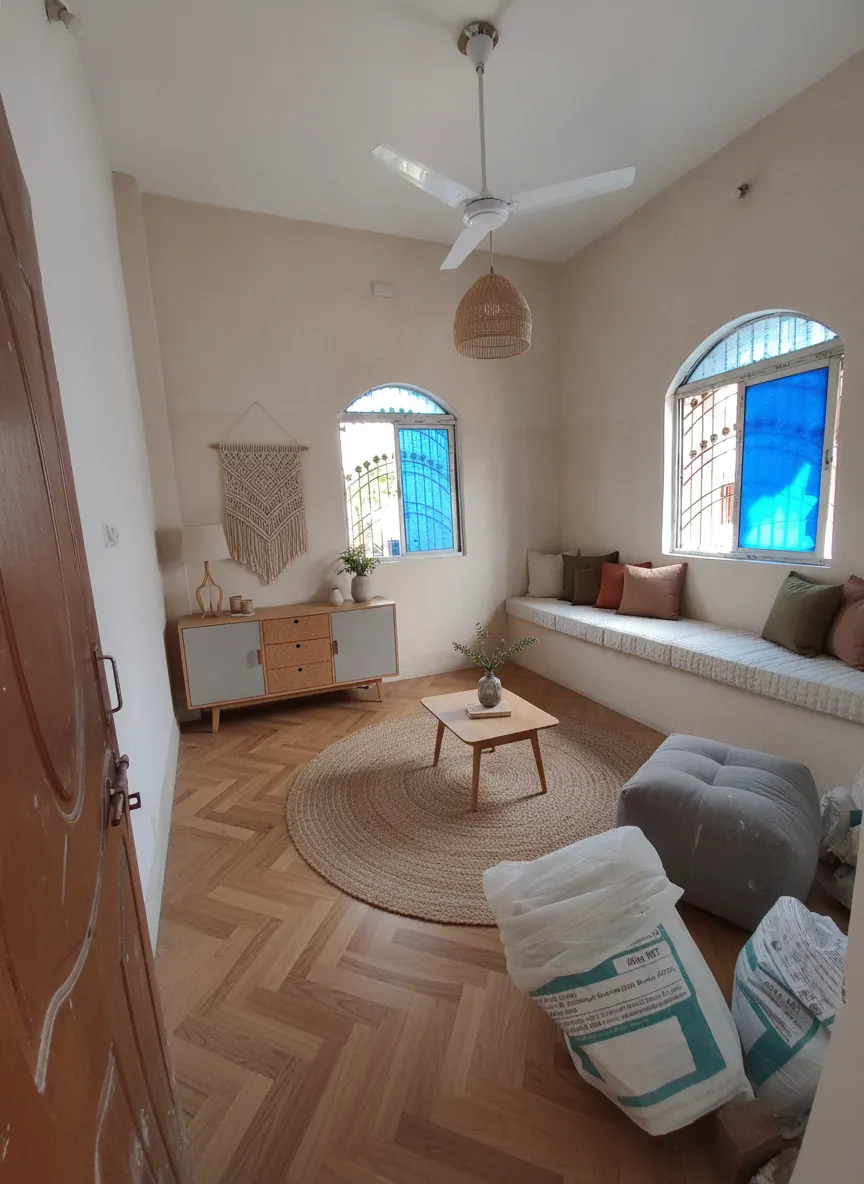
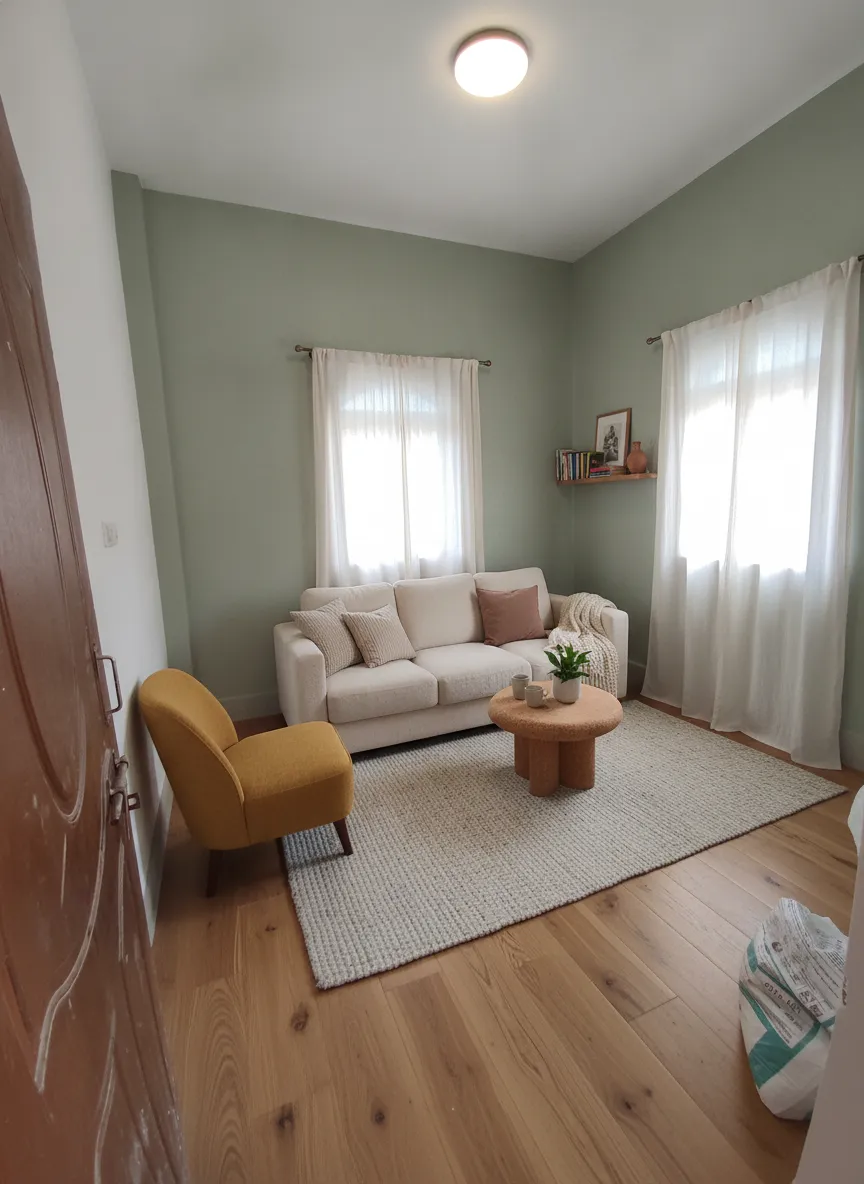
Want to know the real secret?
Instead of making you start from a blank white screen, DesignHome AI tools take a simple photo of your current space and reimagine it instantly.
- Instant Photo Makeovers: Snap a picture of your dated living room and watch the system overlay modern furniture, fresh wall paint, and new flooring in seconds.
- Smart Layout Checks: See if an open-concept arrangement or a sectional sofa gives you more walking room.
- True Lighting & Depth: Check how natural daylight from your windows reflects off dark wood floors or light fabric sofas.
You can stop trying to imagine the final look in your head. Testing your space with an AI room design engine gives you fresh ideas immediately. Using a dedicated AI room makeover system gives you the freedom to test bold colors and new furniture risk-free. Exploring a dedicated room design AI platform opens up possibilities you would never have thought of on your own, giving you true AI interior design power right in your pocket.
Compare the Features That Matter: Furniture, Layouts, Colors and Room Styles
You don't need a giant feature list. You need the things you will actually use.
Focus on tools that solve specific decorating steps:
Layout & Space Planning
A practical room layout planner helps you arrange seating, TV stands, and tables while keeping clear walking paths through the room.
Furniture Matching
A smart furniture planner lets you test different couch sizes, dining tables, and accent chairs so you never buy items that crowd your room.
Wall & Floor Color Testing
A built-in room color visualizer lets you drop warm cream, deep green, or slate gray onto your digital walls to see how shades look under real room lighting.
Choosing AI room design software based on these simple tasks keeps your project moving forward smoothly without getting lost in technical menus.
Best AI Room Planner for Bedrooms, Living Rooms, Kitchens and More
My bedroom needs completely different ideas from my living room.
Every space in your home has a different job, and your design tool should handle them easily:
- Bedrooms: Use a specialized bedroom planner to test headboard sizes, nightstand placements, and calming wall colors that make your space feel relaxing.
- Living Rooms: Use a flexible living room planner to arrange sectional sofas, media consoles, and coffee tables so family and guests move around comfortably.
- Kitchens: Use a dedicated kitchen planner to check cabinet finishes, island sizes, and counter space before ordering expensive materials.
Matching your tool to your space ensures you get practical layout ideas for every room in your house. Downloading a single, versatile AI room planner app lets you switch from bedroom updates to living room makeovers in seconds.
See Your Room Before You Change It: Which AI Planners Create the Most Realistic Results?
You don't want a pretty picture that looks nothing like your real room.
Cheap design apps generate fake, cartoonish pictures with flat lighting. They make wood floors look like plastic and hide realistic room shadows. That creates false expectations when you buy real products.
Look at the difference:
A high-quality AI room visualizer calculates natural sun shadows, fabric textures, and ceiling height depth. When you use a reliable room visualizer, you see how a navy blue velvet couch looks next to a warm oak floor under evening lamp light.
Checking your ideas inside a realistic AI room design app gives you absolute clarity before spending money. You can view real transformation examples in the DesignHome gallery to see how realistic views remove all decorating uncertainty.
Free vs Paid AI AI Room Planners: Which One Is Worth Using?
I want to try it before I pay.
Knowing what is included in free plans helps you plan your project without running into unexpected paywalls:
| Free AI Room Planners | Paid AI Room Planners |
|---|---|
| Basic low-resolution pictures | High-resolution image downloads |
| Standard furniture styles | Full furniture and material libraries |
| Limited room photo uploads | Unlimited AI room makeovers |
| Watermarked exports | Clean downloads without watermarks |
| Slower generation queues | Faster rendering and priority processing |
Here is the bottom line:
If you just want to test one wall color or swap a sofa style once, a free AI room planner or a basic trial of a free room planner gives you quick answers.
However, if you are redecorating your whole home or buying new furniture sets, upgrading to paid passes or a free AI interior design trial saves you from unexpected buying mistakes that cost far more than a software pass.
Best AI Room Planner for Different Needs: Beginners, Decorators and Homeowners
I don't want to learn complicated software just to redesign one room.
Pick a tool that matches your experience level:
For Homeowners & Renters (Fast & Simple)
- Goal: Quick room updates, testing paint colors, moving a couch.
- Best Choice: DesignHome or simple mobile room apps.
- Why: You upload a photo and get instant design ideas without drawing walls or setting up complex software settings.
For Decorators & Home Stagers (Detailed Control)
- Goal: Presenting clear design boards and furniture layouts to clients.
- Best Choice: best AI room design software with custom item selection.
- Why: Lets you pick exact furniture styles, fabric colors, and lighting choices to share clean pictures with clients.
Using an easy room design app or an intuitive AI decorating app keeps decorating fun instead of turning it into a frustrating chore.
How to Choose an AI Room Planner Without Wasting Time
There are too many choices. What should I look at first?
Follow these four simple steps to pick the right app on your first try:
- Start With a Photo First: Pick tools that re-imagine your real room photo instead of making you draw floor plans manually.
- Check for Realistic Lighting: Look at sample images. If the lighting looks like a flat cartoon, move to a better tool.
- Verify the Furniture Catalog: Make sure the app includes realistic sofas, tables, and lamps that match styles you can actually buy.
- Test the Speed: Generating a new room look should take less than a minute. If rendering takes forever, switch to cloud-based AI room planner software.
Learning how to choose a room planner is simple when you focus on tools that work fast. Choosing straightforward room planning software saves you time and gets your room redesigned sooner.
Final Verdict: Which AI Room Planner Is Right for Your Space?
You've compared the top options. Now it is time to pick a tool and bring your room ideas to life.
If you enjoy building technical 3D house models wall-by-wall, legacy apps like Planner 5D give you manual grid controls.
However, if you want to turn a photo of your current room into fresh, realistic design ideas in under 30 seconds, the best AI room design app to start with is DesignHome.
Stop moving heavy furniture blindly. Upload your room photo, test your favorite styles, and transform your home with complete confidence using a modern AI home planner today.
Frequently Asked Questions
Do I need to measure my walls before using an AI planner?
Not if you use a photo-based tool like DesignHome.
Traditional software forces you to pull out a measuring tape and build a digital box from scratch. Photo-based AI tools read scale and depth directly from your picture, letting you test sofa arrangements and accent colors instantly without taking measurements first.
Can an AI room planner show how paint colors look under real lighting?
Yes. High-quality visualizers calculate how sunlight from windows and lamp lighting reflect off wall paint, wood flooring, and fabrics.
Instead of taping paper paint swatches to your wall and guessing, you can test dark navy, warm cream, or sage green on screen to see how shades look throughout the day.
How accurate are AI room redesign apps when placing new furniture?
Photo AI tools maintain your room's structural shell, keeping windows, doors, and wall heights where they belong.
This ensures that a generated sectional sofa, coffee table, or media console looks proportionate to your actual space, preventing you from buying oversized furniture that blocks doorways or crowds your walking paths.
Is DesignHome free to test for room makeovers?
Yes. You can upload a photo of your living room, bedroom, or kitchen to DesignHome and generate fresh room ideas risk-free. It gives you immediate visual options before you spend money on new furniture or paint.
Can an AI room planner help with small or awkward room layouts?
Absolutely. Narrow living rooms, L-shaped spaces, and tiny bedrooms are tough to furnish without making mistakes.
An AI room planner lets you test multi-functional furniture, floating sofa arrangements, and compact storage solutions on screen so you find a comfortable layout that keeps your pathways open.
Will an AI room visualizer help me choose the right rug size?
Yes. Buying a rug that is too small makes your room look disjointed, while an oversized rug swallows your floor space.
Testing rug placements inside a room visualizer lets you see exactly how an 8x10 or 9x12 rug grounds your seating area before you place an online order.
Do I need technical or design experience to use an AI room app?
None at all.
If you can take a picture on your smartphone, you can use modern AI room tools. You simply tap to upload your photo, select a design style or furniture look, and let the software handle the layout work automatically.
Can I share my AI room designs with family or contractors?
Yes. You can download clear images of your new room layouts to share via text, email, or social media.
Showing a contractor or family member an exact picture of the wall color and floor finish stops misunderstandings before work begins.
How do I start redesigning my living room or bedroom right now?
Snap a quick photo of your current room with your phone camera, making sure your windows and floor space are visible.
Next, head to DesignHome, upload your photo, and pick a furniture style to see your space transformed in under 30 seconds.


